

If you’ve been doing business analysis for any length of time, you know that business rules are some of the most complex requirements we have to elicit and analyze. Rules are core to how a business makes key decisions, but they’re almost never documented in one neat place. Instead, rules can be spread across policy documents, project requirements, spreadsheets, emails, half-remembered conversations, and legacy code.
A couple of years ago I made some updates to our Advanced Business Rule and Decision Analysis class. I spent time surfing the Internet looking for real-life business rules and thought that a store return policy might be a relatable example. Here’s what I found for one business:
Make a purchase that’s not what you expected? Not to worry – we can help! We will gladly accept most XYZ Store and XYZ.com merchandise returns in original condition.
Some exclusions apply
Let the analysis work begin…
“Most” merchandise? “Original condition”? And my favorite – “Some exclusions apply”, with a hyperlink to 27 (yes, 27) categories of exceptions. Imagine being a clerk at the store and having to decide whether or not to accept a return. You also have to decide how much to refund the customer, and what form of payment the refund will take. Let’s say that XYZ company wants to automate that decision-making. Before we can do that, the rules must be thoroughly analyzed and documented in a way that allows them to be reviewed, approved, and implemented.
Let’s look at five practical ways you can use AI accomplish this…keeping in mind our “smart intern” principle. Remember Aiden? He can get us part way to a solid representation of our business rules, but you’ll still need to check his work. I’ll also show you some pitfalls to watch out for along the way.
1
Extract Business Rules from Policies and Procedures
I admit it…I hate trying to read long documents and pull process and rule information out. This is a place where I find AI to be really helpful. Just like I could ask my intern Aiden to summarize and reformat the information into something more concise, I can ask AI to do that work.
Example Input to the AI
A 25‑page policy document describing approval rules for automobile loans.
Example Prompt
You’re a business analyst working on a project to improve the profitability of our bank branch offices.
Review this auto loan policy and identify statements that represent business rules.
Organize the rules into a decision‑table format, with clear conditions and outcomes.
Identify the decision being made, the input conditions (including thresholds or ranges), and the resulting outcome for each rule row.
Note any assumptions or ambiguities.
Instead of paragraphs of prose, the AI can return something closer to a structured view of the logic, such as a partial decision table:
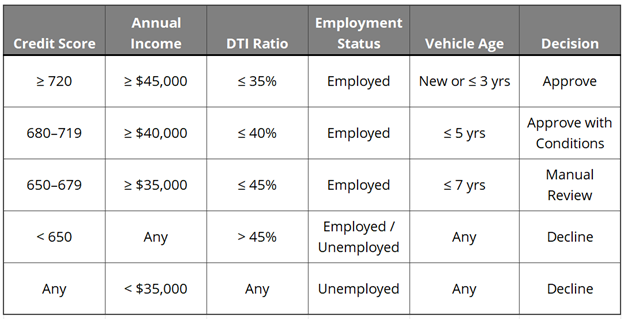
You should not assume this table is “done” or even completely correct. However, it is a much more structured artifact that you can then go back and check against the original source.
Pitfall to Watch For
AI will often pull in background or explanatory text as if it were enforceable logic. Be sure to confirm which statements actually drive decisions.
2
Surface Rules in Requirements and User Stories
Business rules are frequently embedded inside user stories, use cases, and workflows. AI can help separate the decision logic from the process description, then detail the rules involved in making the decision.
Example Input to the AI
A process flowchart describing checkout and shipping behavior.
Example Prompt
You’re a business analyst working on a project to develop a mobile ordering app for an office supply company.
Analyze this process flowchart and identify any embedded business rules or decision logic.
Summarize each rule in simple language.
Example AI Output
- Free shipping applies when order total exceeds $50
- Free shipping does not apply if expedited shipping is selected
- Free shipping eligibility is evaluated before taxes and fees
Pitfall to Watch For
AI may quietly “fill in” details that were never stated. Always go back and confirm the AI output against the original source. Also remember that documentation isn’t always correct. The flowchart you’re using may be out of date or it may not be consistent with the way that your stakeholders really make the decision. Be sure to confirm that these rules reflect the way the business wants to make the decision.
3
Identify Gaps, Conflicts, and Missing Edge Cases
Once you have a draft set of rules, AI can help stress‑test them by pointing out gaps or conflicts that are easy to miss—especially as rule sets grow.
Example Input to the AI
A list of draft discount eligibility rules based on customer type and contract length.
Example Prompt
You’re a business analyst. Your company has recently acquired a small local competitor. Your team needs to understand the pricing and discount guidelines that have been used by the acquired firm. Review these business rules and identify gaps, conflicting rules, or combinations of conditions that are not addressed.
Flag edge cases that may require clarification.
Place your findings in a Word document.
Example AI Output
- No rule covers customers with contract length greater than 36 months
- Partner rules conflict when customer type is “Reseller” and contract length is under 12 months
- No guidance exists for customers transitioning between customer types
This is particularly useful before stakeholder reviews, because we can dig into the gaps during the review.
Pitfall to Watch For
Not every gap is actually a problem. Some combinations may be intentionally unsupported, and some edge cases may never be automated but will instead be given to a human for handling.
4
Validate Rules Using Scenarios
Another effective technique is asking AI to apply your rules to realistic scenarios and walk through the logic step by step.
Example Input to the AI
A set of pricing rules and several sample customer profiles.
Example Prompt
You’re a business analyst who needs to validate a proposed set of pricing rules.
Apply these business rules to the following customer scenarios.
Show which rules apply and the final outcome is for each case.
Put the output into a table in a Word document.
The AI may return a decision‑style view of how scenarios played out, like this:
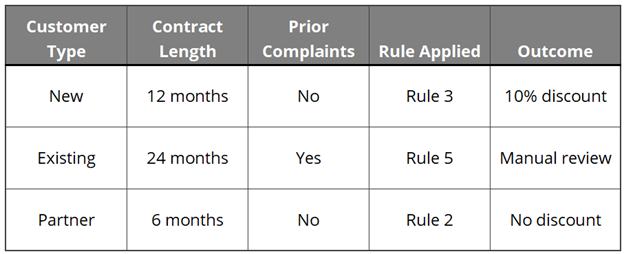
This makes it much easier to spot unexpected interactions between rules.
Bonus Technique
Consider asking the AI to generate some scenarios for you. It may test some unexpected conditions and identify cases you haven’t considered.
5
Improve Rule Documentation and Communication
Finally, AI can help with a very real challenge analysts face: explaining the same business rules to different audiences.
My colleague Ali and I agree on almost everything analysis-related. One place where we don’t agree? She loves to write rules in text. I vastly prefer to put them in decision tables. It’s not uncommon for projects to have multiple stakeholder audiences who want to see information in different formats, like Ali and I would.
Example Input to the AI
A list of business rules documented using RuleSpeak®, SBVR, or another highly structured syntax.
Example Prompt
You’re an analyst who needs to validate a set of business rules that you have developed. You have multiple audiences who need to see the rules in different format. Using this set of rules which is in SBVR format, produce a plain-language version appropriate for business stakeholders. Also provide a decision-table version suitable for developers.
Identify any ambiguous or confusing wording. Place the output in a Word document.
Example AI Output
- A plain‑language explanation describing when discounts apply and why
- Partner rules conflict when customer type is “Reseller” and contract length is under 12 months
Pitfall to Watch For
Cleaner wording is not always more accurate wording. English is a highly ambiguous language, which is one reason why I often prefer tables. Always trace AI‑generated summaries back to the original intent and source and ensure that meaning hasn’t gotten “lost in the translation”.
Wrapping Up
Here’s the obvious takeaway: AI won’t magically make business rules easy, but it can make them less painful. AI is very fast, never tired, and absolutely convinced it’s right. It can read everything, organize it neatly, and even flag things you might have missed. What it can’t do is decide which rules actually matter, which exceptions are worth keeping, or when a perfectly logical rule would be a terrible idea in the real world. That’s still on us.

Kathy Claycomb
Managing Partner, Lead Expert
Kathy Claycomb brings over 35 years of experience to the classroom. She has participated in all phases of solution development using everything from agile to waterfall methodologies (and quite a few in between). Before joining B2T, her career spanned roles from application developer to Senior Director of Services at various organizations. Kathy has broad industry background including transportation, manufacturing, insurance, energy, healthcare, and banking.
Kathy’s first love is teaching, and throughout her career she has always managed to spend a portion of her time instructing. She has an engaging, highly interactive teaching style that ensures students leave the course with a thorough grasp of the material. Her students consistently praise her teaching abilities and her talent for drawing on her personal experience to enhance their learning.
Kathy served as the Technical Editor for Business Analysis for Dummies, 2nd Edition.